SRD Status Check via USSD: What’s Officially Supported (Codes + Steps)
If you’re looking for a USSD code to check your SRD status, you need to know what’s officially supported and what isn’t. Many websites claim you can check your SRD status via USSD, but official SASSA sources tell a different story. This guide clears up the confusion and shows you the safest, most reliable ways to check your SRD R370 status.
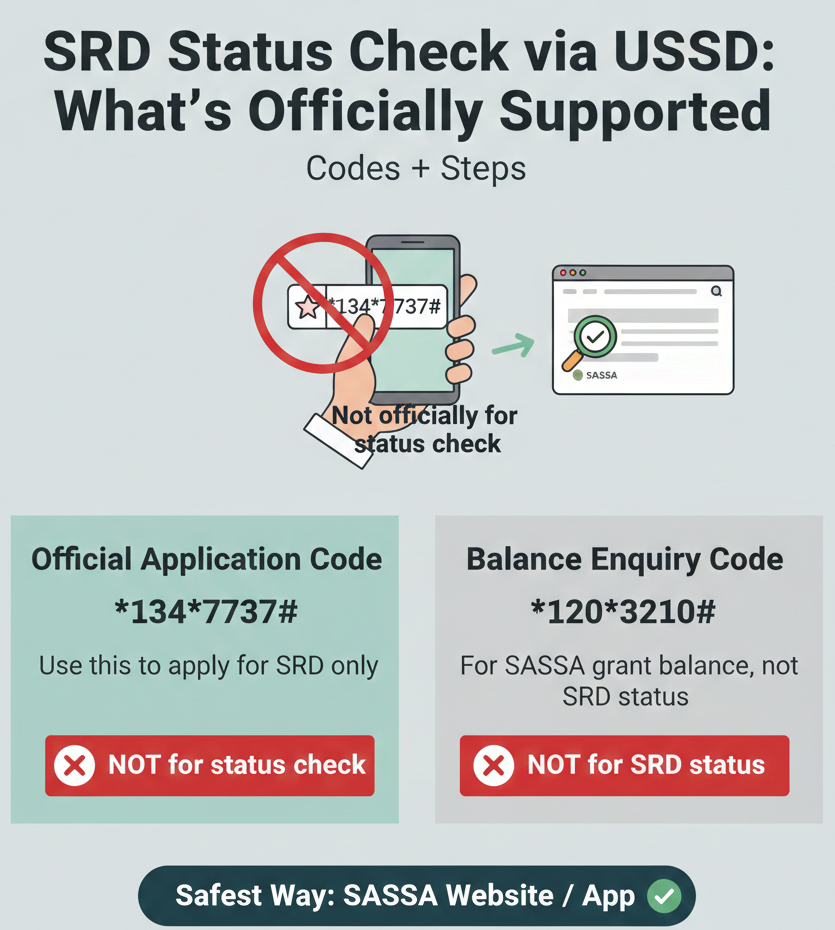
Official Application Code
*134*7737#
Use this to apply for SRD only.
Balance Enquiry Code
*120*3210#
For SASSA grant balance, not SRD status.
Can I check SRD status via USSD?
Official sources direct SRD applicants to check status via the SRD website. USSD is published for SRD applications (historically) and for balance enquiries in separate contexts, but not as an official SRD status-check method.
Do This Instead
-
✓
Check SRD status online: Visit srd.sassa.gov.za to check your status. Enter your 13-digit ID number and 10-digit phone number to view your current status.
-
✓
If you’re applying (USSD option published historically): Dial *134*7737# to apply for SRD R350/R370. Follow the prompts to submit your application.
-
✓
If you need help: Call centre and WhatsApp are listed in official materials for SRD-era support. Contact SASSA at 0800 60 10 11 or use the official WhatsApp channel.
Can You Check SRD Status via USSD?
Official Verdict (Short + Clear)
No, you cannot check SRD status via USSD. Official SASSA sources do not publish any USSD code specifically for checking your SRD application status. When you search online, you’ll find many sites claiming you can dial codes like *120*3210*1# or *120*69277# to check your status, but these codes are not listed on sassa.gov.za or srd.sassa.gov.za.
What official sources show for status checks: The primary official method for checking your SRD status is the SRD website at srd.sassa.gov.za. This is where you enter your ID number and phone number to see whether your application is Approved, Pending, Declined, or requires verification.
Why “random USSD status codes” are risky:
Using unverified USSD codes can lead to several problems. Some codes simply don’t work and waste your time. Others might be part of phishing schemes designed to collect your personal information. Stick to official channels to protect yourself.
Why the Confusion Exists
The confusion around SRD status check USSD codes exists because many third-party websites mix up different USSD functions:
- Application USSD: There is an official USSD code for applying for SRD. This is NOT the same as checking your status. You use this code once when you first apply, not to check whether your application was approved.
- Balance USSD: SASSA publishes USSD codes for balance enquiries for social grant beneficiaries. This is a different service that lets you check your grant balance (how much money is in your SASSA account). It does not show your SRD application status.
- Status checking: This is only officially supported via the SRD website (srd.sassa.gov.za), not via USSD.
When websites talk about “USSD for SRD,” they often fail to clarify which function the code is for. Some sites copy information from other sites without verifying it against official sources. Others make assumptions based on outdated information from the early COVID-19 SRD rollout in 2020, when processes were different.
Always verify claims against official government sources before trusting a USSD code.
USSD for SRD Applications (Officially Published Channel)
While you cannot check your SRD status via USSD, you CAN use USSD to apply for the SRD grant. This is an officially published channel from SASSA.
Code + Step-by-Step
Application Code
*134*7737#
This code is for applying for the SRD R350/R370 grant, not for checking your status after you’ve applied.
Steps:
- Dial *134*7737# on your mobile phone.
- Follow the prompts on the USSD menu. The menu will ask for your personal information.
- Enter your details carefully. You will be asked for your South African ID number, phone number, and other required information.
- Submit your application. Once you complete all the prompts, your application will be submitted.
- Do NOT submit multiple times. Submitting multiple applications can cause processing delays and confusion in the system. Submit once and wait for your status be updated.
What You Need Before You Dial
- South African ID number: Your 13-digit ID number as shown on your ID document. Do not use spaces or dashes.
- Active cellphone number: You must use an active South African mobile number. This number will be registered with your application, so keep it active.
- Accurate information: Make sure all the information you enter matches your official documents. Errors can lead to your application being declined or delayed.
Common USSD Issues + Fixes
USSD menu not loading
Symptoms: When you dial the USSD code, nothing happens, or you see an error message like “Connection problem” or “Service unavailable.”
Likely causes: Network congestion (especially during high-traffic periods like payment weeks), poor signal strength, or temporary issues with your mobile network provider.
Fix steps: Retry later (30-60 mins), move to a location with better signal, switch networks if possible, or check with your network provider for USSD support.
Session timeout
Symptoms: The USSD menu closes or times out before you finish entering your information.
Likely causes: USSD sessions have time limits (usually 60-90 seconds). If you take too long to enter information or pause mid-session, the menu will close.
Fix steps: Complete the process faster by having details ready, retry immediately if it times out, and avoid distractions.
USSD for Balance Enquiry (Separate From SRD Status)
SASSA also publishes a USSD code for balance enquiries. This is a separate service and does NOT show your SRD application status.
Code + What It Actually Does
Balance Enquiry Code
*120*3210#
This code is published as a balance enquiry method for SASSA social grants beneficiaries. It allows you to check the balance in your SASSA account (for example, if you receive an Old Age Grant, Disability Grant, or Child Support Grant and want to know how much money is available).
What it does: Shows your current grant balance and transaction history for SASSA grants linked to your ID.
Cost: This service may incur a small cost depending on your mobile network provider.
What It Does NOT Do
- It does NOT show your SRD application status. Many people dial this code hoping to see whether their SRD application is Approved, Pending, or Declined. That’s not what this code does.
- It is NOT an SRD-specific service. This balance enquiry code is for all SASSA social grants, not just SRD. If you only applied for SRD and don’t receive any other grants, this code might not show useful information for you.
- It does NOT replace the official SRD status check. If you want to know whether your SRD application is approved, you must use the SRD website (srd.sassa.gov.za), not this balance enquiry code.
How to Check SRD Status Officially (Recommended)
Since USSD is not supported for SRD status checking, here are the official methods you should use.
Website (Primary)
The official SRD status check website is srd.sassa.gov.za. This is the primary, most reliable way to check your status.
- Go to srd.sassa.gov.za in your browser.
- Enter your 13-digit South African ID number.
- Enter your 10-digit phone number (the same number you used when you applied).
- Click “Check Status.”
- Review your result.
Important: Your ID number and phone number must match your application details exactly. If your phone number changed, you need to update it via the official contact update page (srd.sassa.gov.za/sc19/contact).
WhatsApp and Other Official Support Channels
- WhatsApp: SASSA operates an official WhatsApp channel for SRD support. Check the official SASSA website (sassa.gov.za) for the current WhatsApp number.
- Call centre: SASSA’s toll-free helpline is 0800 60 10 11. Call during office hours (Monday to Friday, 8 AM to 4 PM).
- Email: For written enquiries, email grantenquiries@sassa.gov.za.
Fake USSD Codes and Scam Warnings
Many websites and social media posts claim to offer USSD codes for checking SRD status. Most of these codes are not official, and some are outright scams.
Common Unverified Codes You Should NOT Trust
- *120*3210*1# – Claimed online for SRD status check, but not verified by SASSA.
- *120*3210*2# – Claimed online for SRD status check, but not verified by SASSA.
- *120*69277# – Claimed online for SRD status check, but not verified by SASSA.
- *134*7737*1# – Some sites claim this checks status, but it’s not listed on official sources.
Safe Rule:
If a USSD code is not listed on sassa.gov.za, srd.sassa.gov.za, or services.sassa.gov.za, do not use it.
FAQs
Can I check SRD status via USSD?
No, you cannot check SRD status via USSD. Official SASSA sources do not publish any USSD code for SRD status checking. Use the official website (srd.sassa.gov.za) to check your status.
What is the official way to check SRD status?
The official way to check SRD status is via the SRD website at srd.sassa.gov.za. Enter your 13-digit ID number and 10-digit phone number to view your status. You can also contact the SASSA call centre at 0800 60 10 11 or use the official WhatsApp channel.
What USSD code is published for SRD applications?
The USSD code for SRD applications is *134*7737#. This code is for applying for the SRD grant, not for checking your application status. Dial the code, follow the prompts, and submit your application once.
Is *120*3210# an SRD status check code?
No, *120*3210# is a balance enquiry code for SASSA social grants beneficiaries. It shows your grant balance, not your SRD application status. It does not tell you whether your SRD application is Approved, Pending, or Declined.
Why do some sites show *120*69277# for SRD status?
This is an unverified claim. The code *120*69277# is not listed on official SASSA sources for SRD status checking. Many third-party websites copy information from other sites without verifying it. Do not trust this code unless you see it published on sassa.gov.za or srd.sassa.gov.za.
What should I never share when checking SRD info?
Never share your OTP, PIN, or banking details with anyone. Official SASSA processes send OTPs and PINs to your phone for verification, but you enter these codes on the official portal yourself. Anyone asking for these is a scammer.
Can I check SRD status via SMS?
No, there is no official SMS service for checking SRD status. You must use the SRD website (srd.sassa.gov.za), the official WhatsApp channel, or the SASSA call centre (0800 60 10 11).
Final Thoughts
While USSD is a convenient tool for many SASSA services, it is not currently supported for checking your SRD R370 application status. For the most accurate and up-to-date information, always use the official online portal. Stick to verified codes and avoid sharing sensitive data on unverified platforms.
Check safely and stay informed.