SRD Status Check via Moya App: How to Access the Official SRD Site Datafree (Step-by-Step)
If you use MoyaApp, you can access the official SASSA SRD website datafree (zero-rated) directly inside the app. This is helpful if you have limited data or prefer using an app instead of a browser. However, it’s important to understand what MoyaApp does and doesn’t do, and how to use it safely to check your SRD status.
Zero-Rated Browsing
Datafree Access
Check SRD without using mobile data.
Verified Portal
Official Site Gateway
Moya opens srd.sassa.gov.za internally.
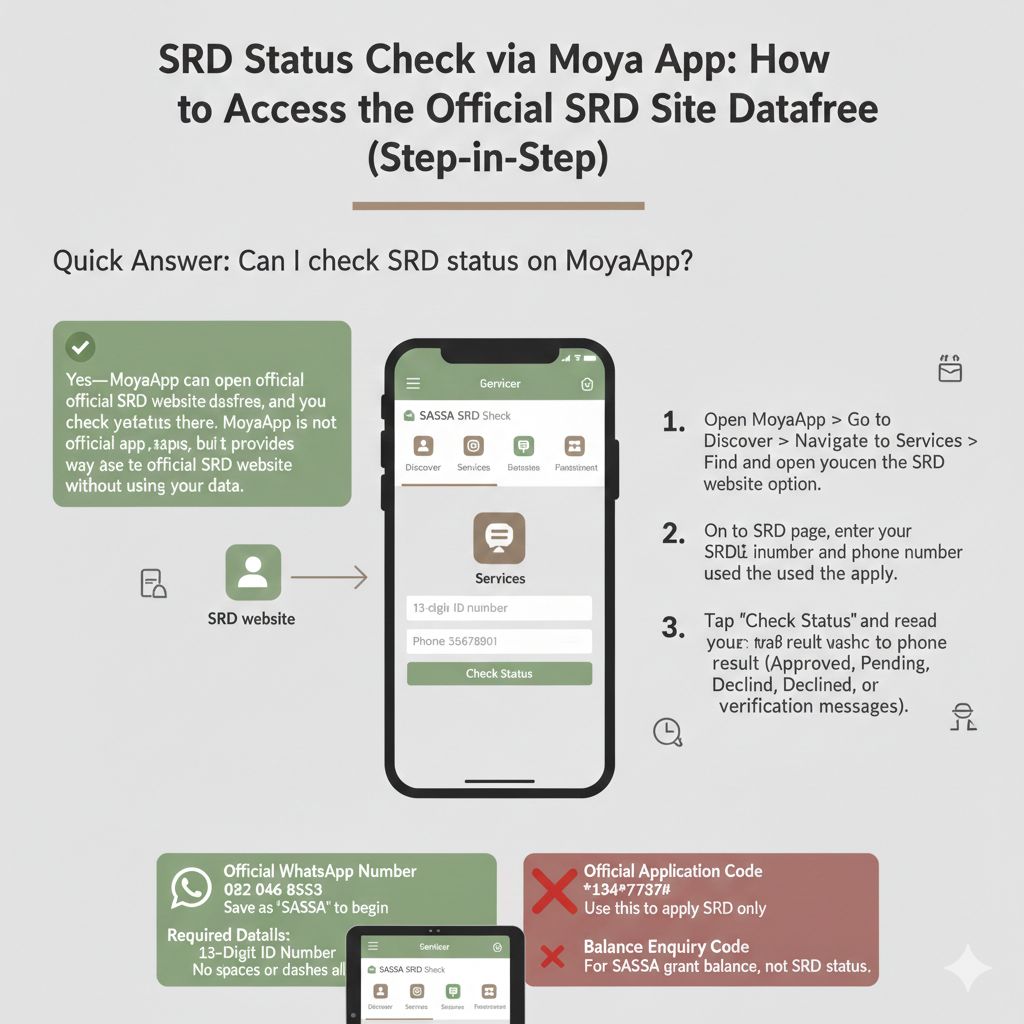
Can I check SRD status on MoyaApp?
Yes—MoyaApp can open the official SRD website datafree, and you check your status there. MoyaApp is not an official SASSA app, but it provides a convenient way to access the official SRD website without using your data.
Steps:
-
1
Open MoyaApp → Go to Discover → Navigate to Services → Find and open the SRD website option.
-
2
On the SRD page, enter your 13-digit ID number and the phone number you used to apply.
-
3
Tap “Check Status” and read your result (Approved, Pending, Declined, or verification messages).
What MoyaApp Is (And What It Is Not)
Before you use MoyaApp to check your SRD status, it’s important to understand what MoyaApp does and what it doesn’t do. Many people mistakenly think MoyaApp is an official SASSA app or that it processes SRD applications. That’s not correct.
What MoyaApp Does for SRD
MoyaApp provides datafree access to the official SRD website inside the app. This means you can open the SASSA SRD website (srd.sassa.gov.za) without using your mobile data. MoyaApp partners with mobile networks to zero-rate certain services, including access to government resources like the SRD website.
Why this is useful:
- Saves data. If you have limited data or no data bundle, you can still access the SRD website for free via MoyaApp.
- Convenient. You don’t need to open a browser and type in the website address. MoyaApp provides a direct link inside the app.
- Mobile-friendly. The SRD website loads inside MoyaApp’s webview, which is optimized for mobile devices.
What MoyaApp actually does: MoyaApp acts as a “gateway” that opens the official SRD website inside the app. Once the website loads, you’re interacting with the official SASSA SRD portal, not with MoyaApp itself. MoyaApp simply provides the connection.
What MoyaApp Does Not Do
MoyaApp does not process SRD applications or payments. It does not have its own system for checking your SRD status, approving applications, or sending payments. All of that is handled by SASSA through the official SRD website (srd.sassa.gov.za).
MoyaApp is not affiliated with SASSA. MoyaApp is an independent company (Moya App (Pty) Ltd) that provides datafree access to various services, including the SASSA SRD website. It is not owned by SASSA, and it does not represent SASSA officially.
Why this matters:
If you encounter any issues with your SRD application or status, you need to contact SASSA directly (via their call centre, email, or WhatsApp), not MoyaApp. MoyaApp cannot help with SASSA-specific issues like declined applications, payment delays, or verification problems. They only provide access to the website.
In short: MoyaApp is a tool to access the official SRD website datafree. It is not a replacement for the official SRD website, and it is not an official SASSA channel. Think of it like a free internet browser that only opens certain websites without using your data.
What You Need Before You Start
Before you use MoyaApp to check your SRD status, make sure you have the following information ready:
- South African ID number (13 digits). This is your primary identifier used across all SRD processes. Your ID number must match the one you used when you applied for the SRD grant. Do not add spaces, dashes, or any other characters—just the 13 digits as shown on your ID card. Example: 8001015009086.
- Phone number used during your SRD application (must match). You must use the 10-digit phone number you registered when you applied for SRD. If you use a different number, the system will not be able to find your application, and your status check will fail. Format: 0821234567 (no spaces, no dashes, starting with 0).
- Stable connectivity. While MoyaApp may provide datafree access to the SRD website, your device and network still need to be connected to the internet. Make sure you have an active connection (mobile data or Wi-Fi) before you start.
Important: If your phone number changed after you applied, you need to update it via the official contact update page (srd.sassa.gov.za/sc19/contact) before you can check your status.
Step-by-Step: SRD Status Check Using MoyaApp
Follow these steps to check your SRD status using MoyaApp.
Step 1: Install the Real MoyaApp (Avoid Fake Apps)
Before you use MoyaApp, make sure you’re downloading the real, official app. There are several apps with similar names on the app stores, and some might be fake or unrelated.
Install from Google Play or Apple App Store only. Do not download MoyaApp from third-party websites, APK sites, or unofficial app stores. These versions might be fake, outdated, or contain malware.
Official store links:
- Google Play (Android): nu.bi.moya
- Apple App Store (iOS): Moya App
How to verify the real MoyaApp:
- Check the publisher name: The real MoyaApp is published by “Moya App (Pty) Ltd”. If the publisher name is different, it’s not the real app.
- Check the package name (Android only): On Google Play, the real MoyaApp has the package name nu.bi.moya.
- Check reviews and download count: The real MoyaApp has millions of downloads and thousands of reviews. If an app has very few downloads or looks suspicious, don’t install it.
Step 2: Open the SRD Website Inside Moya
Once you’ve installed and verified the real MoyaApp, follow these steps to access the SRD website inside the app:
- Open MoyaApp on your device. Tap the MoyaApp icon on your home screen or app drawer.
- Go to “Discover.” On the MoyaApp home screen, you’ll see several sections. Tap on the “Discover” section. This is where MoyaApp organizes various services and resources available datafree.
- Navigate to “Services.” Inside the Discover section, look for a category called “Services”. Tap on it to open the list of available services.
- Find the SRD website entry. Scroll through the Services list until you find the option for “SRD” or “SASSA SRD Grant”. The exact label may vary depending on your app version.
- Tap to open the SRD website. Once you find the SRD option, tap on it. MoyaApp will open the official SASSA SRD website (srd.sassa.gov.za) inside the app’s webview.
What you should see: Once the page loads, you should see the official SASSA SRD status check page. It will have fields for entering your ID number and phone number, and a “Check Status” button.
Step 3: Check Your Status on the SRD Website Page
Now that the official SRD website has loaded inside MoyaApp, you can check your status:
- Enter your ID number. In the first field, type your 13-digit South African ID number. Example: 8001015009086.
- Enter your phone number. In the second field, type the 10-digit phone number you used when you applied for SRD. Example: 0821234567.
- Tap “Check Status.” Once you’ve entered both pieces of information, tap the “Check Status” button at the bottom of the page.
- Read your result. The page will refresh and display your SRD status. You’ll see one of the following: Approved, Pending, Declined, or Identity Verification Failed.
If MoyaApp SRD Page Is Not Working (Quick Fixes)
Sometimes the SRD website might not load correctly inside MoyaApp, or you might encounter errors when trying to check your status. Here’s how to troubleshoot.
Fixes That Moya Itself Recommends
Update MoyaApp to the latest version. This is the most common fix for loading issues. MoyaApp regularly updates its app to improve performance and fix bugs.
Restart the app or your phone and retry. Sometimes a simple restart fixes connection issues. Close MoyaApp completely (swipe it away from your recent apps), then reopen it and try again.
If it still fails, use the SRD site directly in a browser. MoyaApp is a convenience tool, not a requirement. If the SRD website doesn’t load properly inside MoyaApp, switch to a regular browser (Chrome, Safari, Edge, Firefox) and go directly to srd.sassa.gov.za.
When to Switch Channels
If Moya doesn’t load SRD after updates, use these official channels:
- SRD website (primary): Go to srd.sassa.gov.za in your browser.
- WhatsApp channel (official): Message your ID number to 082 046 8553.
- Call centre: Call 0800 60 10 11 to speak to a SASSA representative.
Security and Scam Safety (Must Include)
Using MoyaApp to access the SRD website is generally safe, but you need to follow these security rules to protect yourself from scams.
Verify You’re on the Real SRD Site
When the SRD website loads inside MoyaApp, make sure you’re on the real SASSA SRD website, not a fake or phishing site.
Only trust these domains: srd.sassa.gov.za – Official SRD website; sassa.gov.za – Official SASSA website.
How to check: Look at the URL (web address) at the top of the page inside MoyaApp. If it doesn’t end in srd.sassa.gov.za or sassa.gov.za, it’s not the real site. Close the app immediately and do not enter any information.
What to Never Share
Never share your OTP, PIN, or banking details with anyone. Official SASSA processes send OTPs (One-Time Passwords) and PINs to your phone for verification. You enter these codes on the official SRD portal yourself. SASSA staff will never call, message, or email you asking for your OTP, PIN, or bank account details.
Anyone asking for these is a scammer: OTP or PIN codes; Bank account number, card number, or CVV; ID number or personal information via WhatsApp, SMS, or phone call (unless you initiated the contact with SASSA).
Red Flags
- “Moya” apps with a different package name than nu.bi.moya. Uninstall it immediately.
- Links that don’t end in srd.sassa.gov.za. Close the app and do not enter any information.
- Anyone asking for OTP, PIN, or banking info. If you receive a message asking for these, it’s a scam.
- Requests for upfront payment or “processing fees.” SASSA services are free.
FAQs
Can I check SRD status on MoyaApp?
Yes, you can use MoyaApp to open the official SRD website datafree, then check your status there. MoyaApp provides access to srd.sassa.gov.za inside the app, so you don’t use your own data.
Where is SRD inside MoyaApp?
Go to Discover → Services → SRD website. Tap on the SRD option to open the official SASSA SRD website inside the app.
Is MoyaApp an official SASSA app?
No. MoyaApp is not affiliated with SASSA. It is an independent company (Moya App (Pty) Ltd) that provides datafree access to the official SRD website. SASSA does not own or operate MoyaApp.
Moya SRD page not loading—what should I do first?
Update MoyaApp to the latest version. Go to Google Play or the App Store, search for “MoyaApp,” and tap “Update” if available. After updating, restart the app and try again.
Is it safe to enter my ID number on the SRD page inside MoyaApp?
Yes, as long as you verify the URL is srd.sassa.gov.za. Check the web address at the top of the page inside MoyaApp. If it ends in srd.sassa.gov.za, it’s safe.
Does MoyaApp charge for accessing the SRD website?
No. MoyaApp provides datafree (zero-rated) access to the SRD website, meaning you don’t use your mobile data when accessing it inside the app. However, you still need an active internet connection.
Final Thoughts
MoyaApp is a powerful tool for grant recipients who need to manage their application without the burden of high data costs. By using it as a gateway to the official SASSA portal, you can stay informed and proactive. Always prioritize your digital safety by using official stores and verifying the websites you visit within the app.
Save data, check safe.