SRD Status Check via GovChat: What’s Officially Supported?
Many people search for ways to check their SRD status using GovChat, but there’s widespread confusion about what GovChat actually does for SRD. This guide clears up the misinformation and shows you the official, safe ways to check your SRD R370 status.
Supported Role
New Applications
GovChat officially supports SRD applications.
NOT Supported
Status Checks
GovChat is NOT for checking SRD status.
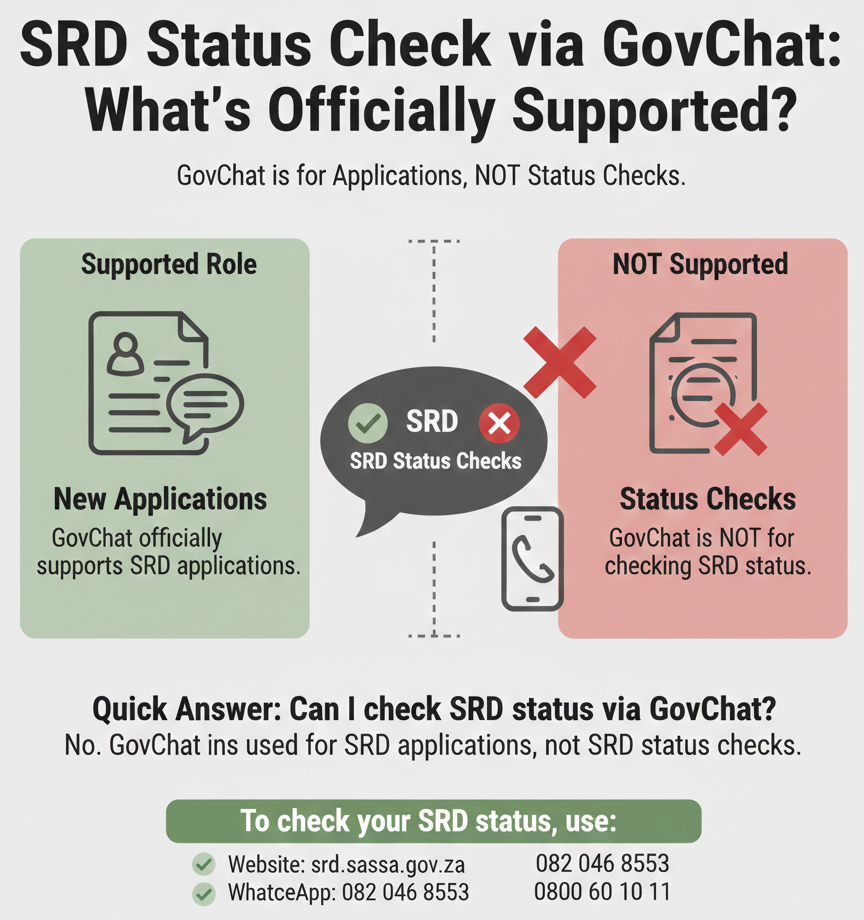
Can I check SRD status via GovChat?
No. GovChat is used for SRD applications, not SRD status checks. Official SASSA sources do not list GovChat as a channel for checking your SRD status. GovChat is designed to help you apply for the SRD grant, but once you’ve applied, you need to use other official channels to check your status.
To check your SRD status, use:
- ✓ Website: srd.sassa.gov.za
- ✓ WhatsApp: 082 046 8553
- ✓ Call centre: 0800 60 10 11
⚠️ Use official channels only. Never share OTP/PIN/bank details with anyone claiming to help you check your status.
Table of Contents
Can You Check SRD Status via GovChat?
Official Verdict
GovChat does not support SRD status checks. This is a safe claim backed by official SASSA sources. When you visit srd.sassa.gov.za, sassa.gov.za, or gov.za, none of these official government websites list GovChat as a channel for checking your SRD status. The official status-check methods are the SRD website, WhatsApp, and the SASSA call centre.
GovChat is used for SRD applications. This is what GovChat officially does for SRD. You can use GovChat to submit a new application for the SRD R370 grant. Once your application is submitted, however, you cannot use GovChat to check whether it was approved, declined, or is still pending.
Why this matters: Many websites and social media posts claim you can check your SRD status on GovChat. These claims are not supported by official sources. Following these instructions might lead you to unofficial or fake services that could compromise your personal information.
What to Do Instead
Use srd.sassa.gov.za for status checks. This is the official SRD status check website published by SASSA. Go to the website, enter your 13-digit ID number and 10-digit phone number (the same one you used to apply), and click “Check Status.” You’ll see your current status: Approved, Pending, Declined, or a verification message.
If you can’t access the website, use WhatsApp 082 046 8553. This is the official SASSA WhatsApp number for SRD support. Save the number to your contacts, message it with your ID number, and wait for a reply with your status. This method is helpful if you have limited data or the website is not loading on your device.
Or call 0800 60 10 11. This is the SASSA toll-free call centre number. Call during office hours (Monday to Friday, 8 AM to 4 PM) to speak to a representative who can check your status for you. This is the best option if you’ve tried the website and WhatsApp but still can’t get your status.
What GovChat CAN Do for SRD
While GovChat does not support status checks, it does have an official role in the SRD process: helping you apply.
SRD Application via GovChat
GovChat is used to apply for SRD, not to check status. If you haven’t applied for the SRD grant yet, or if you need to reapply for a new period, GovChat is one of the official channels you can use to submit your application.
Who should use GovChat to apply: GovChat is helpful if you don’t have reliable internet access or prefer using a chatbot interface instead of filling out forms on a website. GovChat partners with mobile networks to provide zero-rated (datafree) access to certain government services, including SRD applications.
What GovChat does in the application process: GovChat guides you through the application steps using prompts. You provide your personal information (ID number, phone number, address, etc.), and GovChat submits your application to SASSA on your behalf.
What GovChat does NOT do: GovChat does not process your application, approve or decline it, or provide ongoing status updates. After you submit your application via GovChat, all further processing is handled by SASSA. To check whether your application was approved, you must use the official SRD website, WhatsApp, or call centre.
How to Apply via GovChat (High-Level Steps)
If you want to apply for SRD using GovChat, follow these general steps. (Note: These steps are for application only, not status checking.)
Use GovChat official access points:
- Website: govchat.org
- App login: govchat.app
- Facebook Messenger: Search for “GovChat” on Facebook Messenger (only use the official verified page)
General application flow:
- Open GovChat on your preferred platform (website, app, or Facebook Messenger).
- Find the SRD application option. Look for a menu or prompt labeled “SRD,” “SASSA SRD Grant,” or “Apply for SRD.”
- Follow the prompts to submit your application. GovChat will ask you for your personal information step by step. Answer each prompt accurately.
- Submit your application. Once you’ve completed all the prompts, GovChat will submit your application to SASSA.
- Save your Application ID (if provided). GovChat may give you a 6-digit Application ID number. Keep this number safe, as you may need it later.
What to do after applying: Once your application is submitted via GovChat, wait a few days for SASSA to process it. Then check your status using the official SRD website (srd.sassa.gov.za), WhatsApp (082 046 8553), or the call centre (0800 60 10 11). Do not expect GovChat to send you status updates—it does not provide that service.
How to Check SRD Status Officially
Since GovChat does not support status checks, here are the official methods you should use.
Website (Recommended Method)
Website: srd.sassa.gov.za
Why this is the best method: The SRD website is the primary, most reliable way to check your status. It’s fast, accessible 24/7, and doesn’t require you to wait for a reply like WhatsApp or the call centre.
What you need:
- 13-digit South African ID number. Use the same ID number you used when you applied. Do not add spaces or dashes.
- 10-digit phone number used in your application. This must match the phone number you registered when you applied. If your number changed, you need to update it via the contact update page (srd.sassa.gov.za/sc19/contact) before you can check your status.
How it works:
- Go to srd.sassa.gov.za in your browser.
- Enter your ID number in the first field.
- Enter your phone number in the second field.
- Click “Check Status.”
- Read your result.
What you’ll see:
- Approved: Your application is approved for the current period. Wait for payment processing.
- Pending: Your application is still under review. Check again after a few days.
- Declined: Your application was not approved. The page should show the reason for the decline.
- Verification messages: You may see messages like “Identity Verification Failed” or “Awaiting Verification.”
WhatsApp (Official Channel)
WhatsApp number: 082 046 8553
When to use WhatsApp: If you can’t access the SRD website (due to browser issues, network problems, or device limitations), WhatsApp is a good alternative.
How it works: Save 082 046 8553 to your contacts as “SASSA.” Open WhatsApp and start a chat. Send “status” or “Hi” to trigger the menu. Follow the prompts by providing your 13-digit ID number. Wait for a reply with your SRD status within a few seconds to a few minutes.
Call Centre (If You’re Stuck)
Call centre number: 0800 60 10 11
When to call: The website and WhatsApp are not working, you have repeated failures, you changed your phone number, or you’re facing verification problems. Call during office hours (Mon-Fri, 8 AM – 4 PM).
Why Some Sites Claim “GovChat Status Check” (Risk Warning)
You may have seen websites, social media posts, or YouTube videos that claim you can check your SRD status using GovChat. These claims are not supported by official sources.
The Common Misinformation Pattern
Many third-party websites publish detailed step-by-step guides for “checking SRD status on GovChat.” These guides typically include instructions to download the GovChat app, log in, navigate to an “SRD” section, and enter your ID number. They claim you’ll see your status displayed in the app.
Why this is problematic: These instructions are not verified by official SASSA or GovChat sources. When you follow them, you might end up on a fake site designed to steal your info, wasting time on steps that don’t work, or missing official channels entirely.
What You Should Do If You See Those Claims:
Don’t enter personal details on non-official pages. If a website asks for your ID or phone number to “check your SRD status via GovChat,” do not proceed. Close the page and go directly to srd.sassa.gov.za instead.
Use official SRD channels only. Stick to the three official methods listed in this guide. Report any misinformation to SASSA via their call centre or email.
Verify Real GovChat / Avoid Scams
If you decide to use GovChat for SRD application (not status checking), make sure you’re using the real, official GovChat service.
How to Verify Real GovChat
Only trust these domains: govchat.org – Official GovChat website; govchat.app – Official GovChat app login domain.
How to check: Look at the URL in your browser. If it doesn’t end in govchat.org or govchat.app, it’s not the real GovChat. Close the page immediately.
Avoid lookalike domains/apps. Scammers create fake apps and websites with similar names like “govchat-sassa.com” or “govchat-status.co.za.” These are not official. Only use the domains listed above, or download the GovChat app from official stores and verify the publisher is the official GovChat team.
What Not to Share (Must Include)
Never share these with anyone, including on GovChat or any other platform:
- OTP (One-Time Password): SASSA sends OTPs to your phone for verification. You enter these codes on the official SRD portal yourself. SASSA will never ask you to share your OTP via chat, email, or phone call.
- PIN: If you have a SASSA PIN for other grant services, never share it. Legitimate SASSA processes never ask you to share your PIN.
- Banking details: Your bank account number, card number, CVV, or any other banking information should never be shared via chat, email, or unofficial websites. Official banking updates are done via the official SRD website (srd.sassa.gov.za/sc19/contact), not via messaging apps.
“Verification payment” requests are scams. If anyone asks you to pay a fee to “verify your account,” “unlock your grant,” or “speed up your application,” it’s a scam. SASSA services are free.
Red Flags:
- Messages asking for OTP/PIN.
- Links to non-official domains.
- Apps with different publisher identity than official GovChat listings.
- Requests for upfront payment.
- Unsolicited messages claiming to be SASSA or GovChat.
FAQs
Can I check SRD status via GovChat?
No. GovChat is only used for SRD applications, not status checks. Use the official SRD website (srd.sassa.gov.za) or WhatsApp (082 046 8553) to check your status.
What is GovChat used for in SRD?
GovChat is used to apply for the SRD R370 grant. Once you’ve applied, you must use other official channels (website, WhatsApp, call centre) to check your status.
What is the official SRD status check website?
The official SRD status check website is srd.sassa.gov.za. Enter your 13-digit ID number and 10-digit phone number to check your status.
What number do I call for SRD status problems?
Call 0800 60 10 11 (SASSA toll-free call centre). Representatives can check your status for you and help with verification or appeal issues.
Why do some sites say GovChat can check SRD status?
These sites are publishing unverified information. Official SASSA sources do not list GovChat as a status-check channel. Always verify claims against official sources.
What should I do if a site asks for my OTP?
Stop immediately and do not share your OTP. SASSA never asks you to share your OTP via messaging, email, or unofficial websites.
What if my phone number changed since I applied?
You need to update your phone number via the official contact update page: srd.sassa.gov.za/sc19/contact. Enter your ID number and Application ID (AppID) to update your details.
Is GovChat an official government app?
GovChat is an official partner app that works with government services, including SASSA. However, for SRD status checks, you must use the official SASSA channels, not GovChat.
Final Thoughts
Understanding the distinction between application tools and status-check tools is essential for managing your SRD grant efficiently. While GovChat remains a valuable resource for submitting your initial application, the official SASSA portal and WhatsApp line are your only trusted sources for real-time status updates. Stay safe by sticking to verified domains and never sharing sensitive credentials.
Verify twice, check once.