How to Check SRD Appeal Status (Methods)
When you’ve requested reconsideration (commonly called an “appeal”) for a declined SRD application, checking your status is the next step. This guide shows you all the official methods available, what to expect, and how to avoid scams while checking.
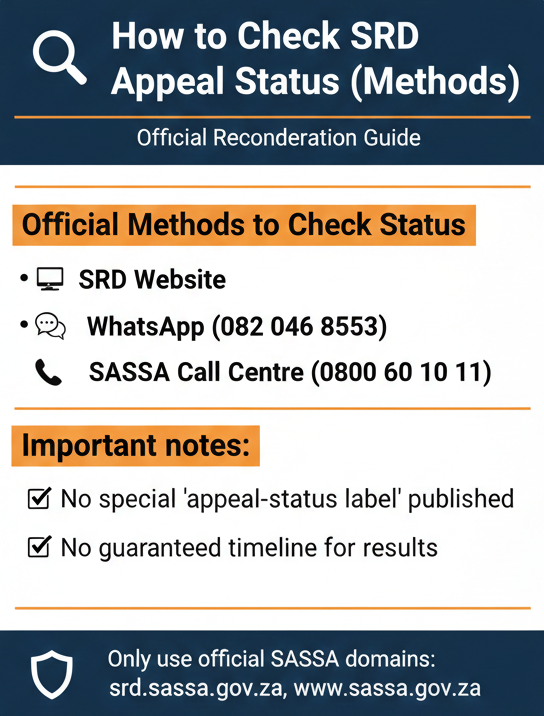
To check your SRD status, use the SRD website and the Application Status tab. Other official channels for status inquiries include WhatsApp (082 046 8553) and the SASSA call centre (0800 60 10 11).
Important notes:
- Official documentation reviewed does not provide a special “appeal-status label”
- No guaranteed timeline for reconsideration results is published officially
Key Terms (Official Definitions Only)
Understanding the official terminology helps you navigate the system accurately.
What “Reconsideration” Means (Official)
The official definition: “If Client’s application is declined, the client has the right to request reconsideration within 30 days of receiving the declined reason”.
This is SASSA’s official process for challenging a declined SRD decision. After you submit a reconsideration request, you’ll want to check its status to see what happens next.
“Appeal” vs “Reconsideration”
The terms “appeal” and “reconsideration” are NOT officially distinguished in the reviewed documentation. SASSA uses “reconsideration” in official sources, while many people online use “appeal.”
Practical note for readers: This guide uses “appeal” as a search-friendly term because that’s what most people search for, but we follow the official process language (“reconsideration”) when explaining how things work.
Official Methods to Check Status
SASSA provides multiple official channels for checking your SRD status. Here’s what’s officially documented.
Method 1: SRD Website (Official)
The primary official method: “Application status can be viewed on the following Channels: Visit SRD Website: https://srd.sassa.gov.za – Under Application Status tab: click here to check status”.
Channel: https://srd.sassa.gov.za
Navigation: Application Status tab → “click here to check status”
Method 2: WhatsApp (Official)
Official contact: “WhatsApp: send message to 082 046 8553”.
Important constraint: The reviewed official source confirms this number but does not specify what text or keyword to send, or what details will be requested. The documentation simply states “send message” without further step-by-step instructions.
Method 3: Call Centre (Official)
Official contact: “Toll Free Call Centre: Contact- 0800 60 10 11”.
Important constraint: The reviewed official source provides the number but does not publish a step-by-step call flow or menu options. You’ll need to follow the prompts when you call.
Method 4: Email (Official Contact)
Official email: “Send an email to: Grantsenquiries@sassa.gov.za”.
Position this as: A support and contact channel officially provided, though the reviewed documentation doesn’t explicitly describe it as an “instant status check method.”
Method 5: SASSA Chatbot (Official Channel)
Official reference: “SASSA Chatbot: www.sassa.gov.za”.
Important constraint: The chatbot is officially mentioned as a channel, but the reviewed documentation doesn’t explicitly confirm it can check reconsideration status or provide detailed functionality.
Step-by-Step Instructions by Method (Verified-Only)
Here’s how to use each method, limited to what’s officially documented.
Website: Check Status on SRD Portal
The official instruction: “Visit SRD Website: https://srd.sassa.gov.za”. Type this URL directly into your browser’s address bar.
Official navigation: “Under Application Status tab: click here to check status”. Look for the Application Status section on the page.
The portal will guide you through the remaining steps.
WhatsApp: Check Status
Official instruction: “WhatsApp: send message to 082 046 8553”. Open WhatsApp and start a new chat with this number.
Call Centre: Check Status
Official contact: “Toll Free Call Centre: Contact- 0800 60 10 11”. Dial this number from any South African phone.
Email: Ask for Help
Official email: “Send an email to: Grantsenquiries@sassa.gov.za”.
What to include (best-practice guidance):
- Your ID number: So SASSA can look up your application
- Your full name: As it appears on your ID
- Short issue description: e.g., “I would like to check my SRD reconsideration status”
- Mobile number: In case they need to call you back
What NOT to include: Never share your OTP or PIN in an email. SASSA will never ask for these via email.
How to Read the Status You See (Official Status Definitions)
Once you check your status using any method, here’s how to interpret what you see.
| Status Term | Official Definition | Interpretation |
|---|---|---|
| Pending | “Verification of the application for the period is pending.” | SASSA is still reviewing. Your information is being verified. Waiting status—no action needed. |
| Declined | “The application was declined for the period and the reason is provided.” | Didn’t meet criteria for that month. If seen after reconsideration, it means reconsideration was still declined. |
| Approved (no payment date) | “Approved: The application was approved for the period. If no pay day value is provided, no payment has been processed as yet.” | Approved! Your reconsideration was successful. Keep checking for a “pay day” date to appear. |
| Canceled | “Canceled: The grant is cancelled.” | Grant is not active. If you didn’t cancel it, contact SASSA immediately. |
Are There Appeal-Specific Status Labels?
NOT FOUND (OFFICIAL) in the reviewed sources. There’s no special status like “Reconsideration Under Review” or “Appeal Approved”. Your status will likely show “Pending” while being reviewed.
What Happens Next + Timelines (Official Processing Language)
Managing expectations about how long status checks and reconsideration processing take.
Official acknowledgment of delays
“SASSA has experienced delays processing reconsiderations for the COVID-19 SRD Grant”.
SASSA has asked for “patience and restraint from affected clients while the resolution of the process is accelerated”.
No Official Timeframes Published
No official processing timeframe was found in the reviewed sources. You will NOT find official statements like “Check your status every 7 days” or “Processing takes 30 days”.
Practical Guidance (Careful Wording):
- Check periodically via official channels. Since there’s no guaranteed timeframe, regular checking is your best approach.
- Avoid anyone promising “fast approval” or “guaranteed timeline.” These claims are not operating on official information.
- Be patient but persistent. If weeks pass with no status change, use official contact channels to inquire.
Safety: Avoid Scams While Checking Status (Official Warnings)
Protecting yourself from scams is crucial when checking your status.
OTP / PIN Safety
The official reference: “Client will receive a sms with 6 digit OTP number”. Safety instruction: Never share your OTP or PIN with anyone claiming to “check status” for you.
Common scams include:
- Someone calling claiming to be from SASSA asking for an OTP.
- WhatsApp messages asking for your PIN to “speed up” checks.
- Websites that look like SASSA but ask for your OTP.
Banking Detail Safety (Official)
Official warning: “The bank account details provided must be in the name of the applicant, because SASSA cannot pay into the account of any person other than the approved applicant”.
Never share your banking details with anyone claiming to help you check your status. SASSA already has your information if you’ve applied.
Safe approach checklist
- Don’t pay agents for faster checks
- Don’t pay for “priority status checks”
- Don’t send airtime or money to anyone
- Use only official channels (all are free)
Safe Domains:
Only trust these domains: srd.sassa.gov.za and sassa.gov.za. Any other website—even if it has “SASSA” or “SRD” in the name—is not verified.
Troubleshooting (Verified-Only Boundaries)
When the standard methods don’t work, here’s what to do.
If the Website Is Down or Slow: Use alternate official channels: WhatsApp (082 046 8553) or Call centre (0800 60 10 11).
Details Required for Checks
The reviewed official documents do not specify the exact required fields for status checks. General guidance: Follow on-screen or voice instructions. Be prepared to provide your ID number and mobile number.
FAQs
How do I check SRD appeal status?
Use the SRD website at https://srd.sassa.gov.za, navigate to the Application Status tab, and click here to check status. You can also contact SASSA via WhatsApp (082 046 8553) or call centre (0800 60 10 11).
Can I check SRD appeal status on WhatsApp?
Yes. The official WhatsApp number is 082 046 8553. Send a message to this number and follow the prompts.
What is the SRD call centre number for status checks?
The official toll-free call centre number is 0800 60 10 11. It is free to call from any South African phone.
What does “Pending” mean on SRD status?
Official definition: “Verification of the application for the period is pending”. Your application or reconsideration is being reviewed.
What does “Approved (no payment date)” mean?
Official definition: “Approved: The application was approved for the period. If no pay day value is provided, no payment has been processed as yet”. Your reconsideration was successful!
Is there a timeline for reconsideration results?
SASSA has acknowledged delays. No official timeframe (like “7 days” or “30 days”) is published in the reviewed sources.
Is there a fee to check status?
No official fee wording was found. The official status-checking methods are free to use. Avoid paying anyone for this service.
Quick Reference: Methods Summary
| Method | Contact/URL | How to Use | Official Source |
|---|---|---|---|
| Website | https://srd.sassa.gov.za | Go to Application Status tab → click here to check status | special.pdf |
| 082 046 8553 | Send message to this number | special.pdf | |
| Call Centre | 0800 60 10 11 | Call toll-free number | special.pdf |
| Grantsenquiries@sassa.gov.za | Send inquiry email | special.pdf | |
| Chatbot | www.sassa.gov.za | Access chatbot on SASSA website | special.pdf |
Use only official channels for status checks.
Expect waiting periods and stay persistent.
Final verification note: This guide uses only information verified from official SASSA sources as of January 23, 2026.