How to Appeal an SRD Decline (Step-by-Step) — Official Reconsideration Guide
If your SRD application shows “Declined,” you have the right to challenge that decision through an official process SASSA calls “reconsideration.” This verified-only guide walks you through every step using only information from official SASSA sources.
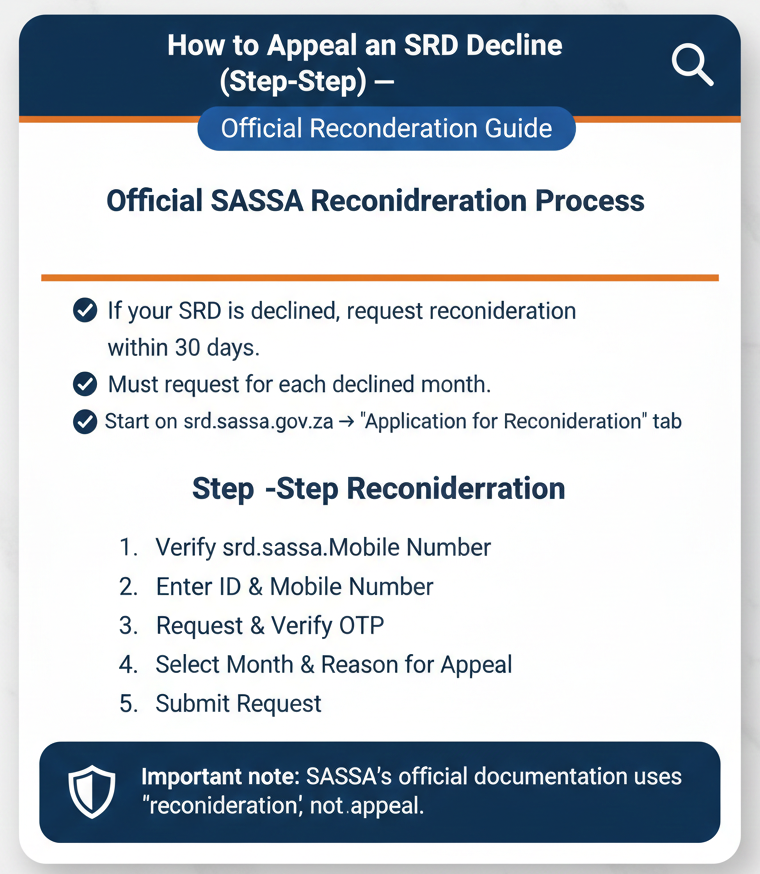
If your SRD is declined, you can request “reconsideration” (the official term SASSA uses) within 30 days of receiving the declined reason. You must request reconsideration for each month that is declined. Start on srd.sassa.gov.za → “Application for Reconsideration” tab.
Important note: SASSA’s official documentation uses “reconsideration,” not “appeal”. They mean the same thing for practical purposes—challenging a declined decision—but the official portal and documents use “reconsideration.”
Appeal vs Reconsideration: What SASSA Calls It
Understanding the official terminology helps you navigate the portal and find the right information.
SASSA uses “reconsideration” officially
The official documentation states: “If Client’s application is declined, the client has the right to request reconsideration within 30 days of receiving the declined reason”.
Notice the wording: “request reconsideration”—not “appeal” or “dispute.” This is the term you’ll see on the official SRD website and in SASSA documents.
While many people online use the word “appeal” (and it’s not wrong in everyday language), SASSA’s official system doesn’t use this term in the reviewed documentation. When you’re looking for the option on the portal, search for “Application for Reconsideration” or “Reconsideration”—not “Appeal.”
The official right and timeframe (verified)
Your right to challenge a decline is officially documented: “the client has the right to request reconsideration within 30 days of receiving the declined reason”.
This gives you a clear, official timeframe. The 30-day countdown starts when you receive the reason for your decline, not when you first check your status. Make sure you know what date you were notified before calculating whether you’re still within the window.
When You Should Request Reconsideration
Not every SRD situation calls for reconsideration. Here’s when it’s the right option.
If you see “Declined” for a month
The official status definition: “The application was declined for the period and the reason is provided”.
If your status check shows “Declined” for any month, and you believe the decision is wrong or doesn’t reflect your actual circumstances, you can request reconsideration for that specific period.
Important rule: reconsideration is monthly (verified)
This is crucial: “Client must request reconsideration for each month that the application is declined”.
Reconsideration isn’t a one-time fix for all months. The SRD grant operates on a monthly verification and payment cycle. If you’re declined in February and March, you need to request reconsideration separately for February AND for March. Requesting reconsideration for one month doesn’t automatically fix other declined months.
This monthly structure means:
- Check your status for each month individually
- Note which specific months show “Declined”
- Request reconsideration for each declined month within 30 days of receiving that month’s declined reason
Transparency about what we don’t know
No official list of decline reasons was found. While your status should show a reason when you’re declined, SASSA hasn’t published a comprehensive list of all possible decline reasons in the reviewed documentation.
No official processing time or timelines were found. We can’t tell you “reconsideration takes X days to process” because SASSA hasn’t published this information officially.
No official “appeal outcome labels” were found beyond the standard status terms. After you request reconsideration, you’ll see the normal SRD statuses (Pending, Approved, Declined)—there’s no special “reconsideration approved” or “reconsideration denied” status.
Where to Request Reconsideration (Official Portal Path)
Using the correct portal protects your information and ensures your reconsideration request is properly recorded.
Use the official SRD website
The official instruction: “Visit SRD Website: https://srd.sassa.gov.za”.
Once you’re on the site, look for the specific navigation tab. The official guidance: “Under Application for Reconsideration tab: click here to apply for reconsideration”.
This tells you exactly what to look for:
- A tab or section labeled “Application for Reconsideration”
- Within that section, a link or button saying “click here to apply for reconsideration”
Safety reminder (domains)
Only these two domains are safe for SRD matters: srd.sassa.gov.za and sassa.gov.za. Any other domain—even if it looks similar—is not verified. Type the URL directly into your browser. Don’t click links from emails, WhatsApp messages, or social media posts.
What You Need Before You Start (Official Requirements)
Having these items ready ensures a smooth reconsideration process.
Required details (verified)
- ID number: Your South African ID number, exactly as it appears on your ID document. The official process requires: “Provide ID number and mobile number, then click send pin”.
- Mobile number: The mobile number registered with your SRD application. Same official requirement: “Provide ID number and mobile number, then click send pin”.
- OTP (6-digit PIN) via SMS: You must be able to receive text messages. The official process confirms: “Client will receive a sms with 6 digit OTP number”.
Make sure your phone has network coverage, you have the SIM card that matches your registered mobile number, and you can receive SMS (some data-only plans don’t support SMS).
No reconsideration-specific consent or declaration language was found in the reviewed documentation. While the general SRD application process includes consent and declaration steps, the specific reconsideration flow as documented doesn’t explicitly mention additional consent forms.
Step-by-Step: How to Request Reconsideration (Click-by-Click)
Follow these exact steps from official SASSA documentation to request reconsideration of a declined SRD application.
Go to https://srd.sassa.gov.za. Type this address directly into your browser’s address bar. Don’t use a search engine.
Under “Application for Reconsideration” tab: click here to apply for reconsideration. Look for the menu item inside this section.
Provide ID number and mobile number, then click “send pin”. Enter digits exactly (13 for ID, 10 for phone).
Client will receive a sms with 6 digit OTP number. This code arrives on your phone; wait a few minutes if delayed.
Applicant must insert the OTP number and click “verify pin”. Follow on-screen prompts to complete the request.
How to Check Your Reconsideration / Application Status
After requesting reconsideration, monitor what happens next. The official method: “Application status can be viewed on the following Channels: Visit SRD Website: https://srd.sassa.gov.za – Under Application Status tab: click here to check status”.
Official contact channels (verified for inquiries)
082 046 8553
“Send WhatsApp message to 082 046 8553”. Use for status inquiries.
0800 60 10 11
“Toll Free Call Centre: Contact- 0800 60 10 11”. Free from any SA phone.
Grantsenquiries@sassa.gov.za
Useful for written documentation of your status inquiry.
Important clarification: These channels are for status inquiries—asking about your status. They are not methods to submit the reconsideration itself.
Status Meanings You Might See (Official Definitions)
Understanding these terms helps you interpret what SASSA is telling you at each stage of the reconsideration process.
| Status Term | Official Definition | Source |
|---|---|---|
| Declined | “The application was declined for the period and the reason is provided.” | SRD Status PDF |
| Pending | “Verification of the application for the period is pending.” | SRD Status PDF |
| Approved (no payment date) | “Approved: The application was approved… If no pay day value is provided, no payment has been processed as yet.” | SRD Status PDF |
| Canceled | “Canceled: The grant is cancelled.” | SRD Status PDF |
Troubleshooting (Verified-Only Safe Guidance)
If you can’t receive the OTP: The OTP is a required part of the verification process: “Client will receive a sms with 6 digit OTP number”. Without it, you can’t complete the reconsideration request. Possible reasons include wrong number entered, no signal, or SIM issues. Contact SASSA via WhatsApp, Call Centre, or Email if problems persist.
If you changed your mobile number: The process requires the mobile number registered with your SRD application. To change it: “To change Mobile number Client must contact SASSA Toll Free Call centre on: 0800 60 10 11”. You must contact SASSA directly; you can’t update it yourself on the portal.
Scam and Safety Section
Protect your OTP and details
Never share your OTP with anyone. SASSA will never call, WhatsApp, or email asking for it. The only place this code should be entered is on the official SASSA portal (srd.sassa.gov.za). If someone contacts you asking for it, it’s a scam.
False information warning (official)
“I understand and agree that any false and/ or misleading information in the application is punishable by law”.
Claims to avoid (unofficial):
- “Appeal via WhatsApp” — NOT FOUND (OFFICIAL). WhatsApp is for inquiries, not submission.
- “Appeal via USSD” — NOT FOUND (OFFICIAL). No official code exists in documentation.
- “Pay a fee to appeal” — NOT FOUND (OFFICIAL). The process should be free. Anyone asking for money is running a scam.
- “Guaranteed approval” — NOT FOUND (OFFICIAL). Approvals depend on eligibility criteria.
- “Deadline other than 30 days” — CONTRADICTS OFFICIAL SOURCES. Official deadline is 30 days from reason.
FAQs
What does “reconsideration” mean for SRD?
Reconsideration is SASSA’s official term for challenging a declined SRD application. The official definition: “the client has the right to request reconsideration within 30 days of receiving the declined reason”. It’s what most people call “appealing” a decline.
What is the deadline to appeal an SRD decline?
You have 30 days from receiving the declined reason to request reconsideration. This is the official timeframe. The countdown starts when you receive the reason for your decline.
Do I need to appeal for each declined month?
Yes. The official rule: “Client must request reconsideration for each month that the application is declined”. SRD operates on a monthly cycle, so you need to request reconsideration separately for each declined month.
What details do I need to appeal?
You need your South African ID number, the mobile number registered with your SRD application, and the ability to receive a 6-digit OTP via SMS.
How do I check my appeal status?
Visit srd.sassa.gov.za, go to the “Application Status” tab, and “click here to check status”. You can also inquire via WhatsApp (082 046 8553), call centre (0800 60 10 11), or email (Grantsenquiries@sassa.gov.za).
Can I appeal via WhatsApp?
No. WhatsApp is for status inquiries and support, not for submitting reconsideration requests. The official reconsideration process must be completed through the SRD website portal.
Is there a fee to appeal?
No official fee for reconsideration was found in the reviewed documentation. The online reconsideration process should be free. Anyone asking you to pay to request reconsideration is likely running a scam.
What happens after I appeal?
No official processing timeline was found in SASSA documentation. After you submit your request, check your status regularly on the SRD website. Watch for your status to change from “Declined” to “Pending” or “Approved”.
What does “Declined” mean?
Official definition: “The application was declined for the period and the reason is provided”. Your application didn’t meet eligibility criteria for that month, and a reason should be shown.
What does “Pending” mean?
Official definition: “Verification of the application for the period is pending”. SASSA is reviewing your application or reconsideration. No action needed from you—this is a waiting status.
What does “Approved (no payment date)” mean?
Official definition: “Approved: The application was approved… If no pay day value is provided, no payment has been processed as yet”. You’re approved, but payment hasn’t been scheduled yet.
What does “Canceled” mean?
Official definition: “Canceled: The grant is cancelled”. Your grant application is not active. If you see this status and didn’t cancel your application yourself, contact SASSA immediately.
Do This Now: Reconsideration Checklist
- Check which month shows “Declined”
- Count 30 days from receiving the declined reason
- Go to srd.sassa.gov.za → Application for Reconsideration
- Enter ID + mobile → send pin
- Enter OTP → verify pin → submit
Verified Sources (Transparency)
- special.pdf — “You and Your Special COVID-19 SRD Grant – step by step application process – V2 – 05/08/2021”
- status.pdf — “#SASSACARES” — Source for Declined, Pending, Approved, and Canceled definitions.
- declaration.pdf — “DECLARATION BY APPLICANT FOR APPLICATION OF COVID-19 SOCIAL RELIEF OF DISTRESS GRANT”
Reconsideration is your official right.
Follow the portal steps for a successful challenge.
Refer to facts verified as of January 23, 2026.